Home printers, office copy centres, and craft cutters all perform better when your artwork is locked to physical millimetres instead of a loose word-processor table. Whether you are preparing ten business cards on a card stock sheet, arranging family snapshots for an album, or laying out round pantry seals, every tool here renders locally on your device so files never leave your computer.
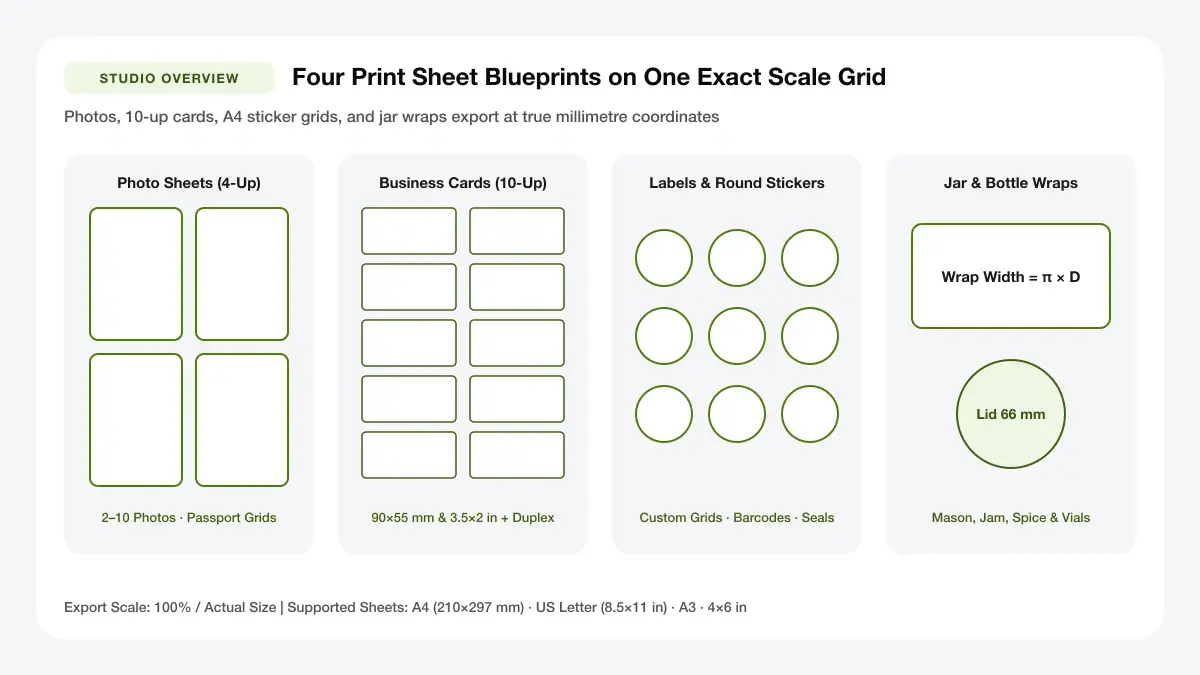
Print Sheet Maker Multi-Up Grid Blueprint
Browser-based imposition engine generates 300 DPI PDF sheets with calibrated margins, gutters, and crop marks for home printers.
— PRINT SHEET STUDIO —
Choose your print sheet
Start by choosing one of the four print sheet categories below. Each hub groups specialised sheet tools, paper-size references, step-by-step tutorials, and printer guides so you never waste a sheet testing margins by hand.
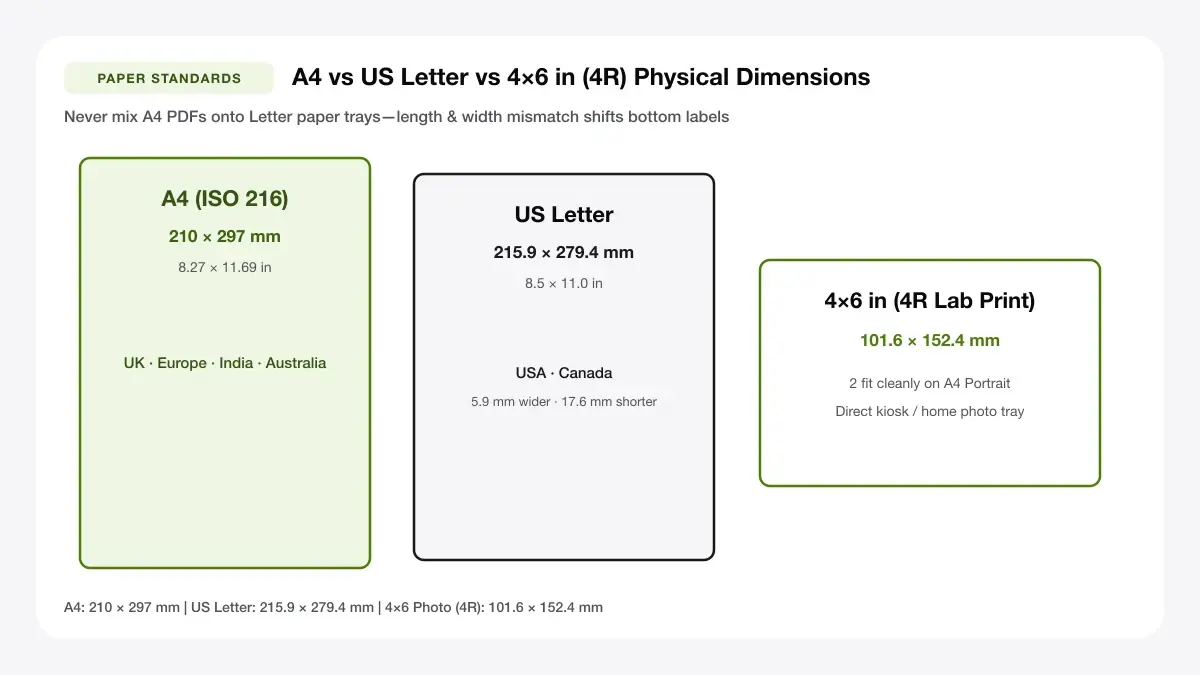
A4 (210 x 297 mm) vs US Letter (8.5 x 11 in) Safe Margins
Compare exact width, height, and safe 5 mm home-printer margins between ISO A4 and ANSI US Letter stocks before exporting.
Photo sheets
Combine multiple snapshots onto one page, repeat a single portrait across wallet slots, build A4 or 4×6 collages, prepare passport grids, or split a large wall poster across multiple sheets.
Business cards
Design or upload card artwork, place 8 or 10 cards per sheet with hairline crop marks, export front-and-back PDFs, or align layouts to perforated card stock.
Labels and stickers
Build printable label grids, circular seals, bulk address and shipping sheets, scannable EAN-13/UPC/Code 128 barcode sheets, planner sticker pages, and conference name tags.
Jar, bottle and candle labels
Size front labels, lid circles, and wrap-around bands for mason jars, jam preserves, A–Z spice racks, soy candles, glass juice bottles, and essential oil dropper vials.
How a print sheet maker works
Every layout tool in this print sheet maker follows the same three-step workflow so you can move from raw content to a finished sheet in under two minutes without installing desktop publishing software.
Upload or type your content
Drop in JPG or PNG photos, upload an exported Canva or Photoshop card image, paste a list of shipping addresses or conference guest names, or type product details directly into a clean form.
Pick a sheet size and grid
Select A4 (210 × 297 mm), A3 (297 × 420 mm), US Letter (8.5 × 11 in), or 4×6 inch (101.6 × 152.4 mm). Choose a preset grid—such as 2×2 photos, 10-up business cards, or 24-up A4 labels—and fine-tune spacing, margins, and crop marks while watching the proportional preview update in real time.
Download a print-ready PDF
Click Download Print-Ready PDF to generate a locked-dimension PDF file in your browser. Open the PDF and print at Actual Size (100% scale) so every photo, card, and label matches your ruler measurements down to the millimetre.
— INSTANT BROWSER LAYOUT STUDIO —
Create Exact-Size Photo, Card & Label Sheets in Seconds
Skip complex word-processor tables. Pick A4, A3, US Letter, or 4×6 inch paper, drop in your images or text, and export a 100%-scale print-ready PDF.
Online sheet maker for every print layout
Using an online sheet maker avoids the distortion that happens when office apps automatically shrink margins or rescale photos. Instead of guessing how many inches wide a cell is inside a word processor, an online sheet maker computes exact physical coordinates on the page canvas.
Print layout generator for any paper size
A reliable print layout generator lets you switch paper standards without rebuilding your design from scratch. Whether your local store stocks metric A4 sheets or North American Letter card stock, the print layout generator recalculates centering, margins, and slot counts automatically.
A4, A3, Letter and 4x6
| Paper Format | Millimetres | Inches | Best For |
|---|---|---|---|
| A4 | 210 × 297 mm | 8.27 × 11.69 in | Home printers, labels, stickers, A4 collages |
| A3 | 297 × 420 mm | 11.69 × 16.54 in | Large photo sheets, multi-tile posters |
| US Letter | 215.9 × 279.4 mm | 8.5 × 11 in | North American card stock and label sheets |
| 4×6 in (4R) | 101.6 × 152.4 mm | 4 × 6 in | Photo kiosks, dye-sub printers, passport strips |
Custom print sheet maker options
Every project has different cutting and finishing needs. With a custom print sheet maker, you control outer margins, horizontal and vertical gutters, crop-to-fill versus fit-whole framing, and hairline trim guides.
Grids, margins and cut guides
Turn on corner crop marks when trimming cards with a steel ruler or guillotine, or switch on full dashed cut outlines when testing alignment on plain paper before feeding expensive sticker sheets.
Sheet creator online: no sign-up needed
A sheet creator online should never force you to create an account just to print four photos or a sheet of spice labels. Because all canvas rendering and PDF assembly run client-side inside your browser, there are no upload queues, account walls, or usage watermarks.
Convert images to printable PDF sheets
Raw JPG and PNG files store pixels, not reliable print dimensions—printers often guess 72 DPI or 96 DPI and print images huge or tiny. Converting your images into a structured PDF locks exact millimetre placement.
Image to printable PDF
Use the image to printable PDF workflow when you want to combine several JPG or PNG files onto one A4 sheet, repeat one portrait across wallet-size frames, or split a single large illustration across multiple pages.
JPG and PNG to print-ready PDF
Our converter normalises image aspect ratios inside each grid slot and embeds high-resolution compressed frames directly inside the PDF page box, eliminating browser print-dialog surprises.
PDF sheet maker for multi-page files
When you need front-and-back business cards or a 2×2 or 3×3 tiled wall poster, the PDF sheet maker automatically emits multi-page PDF documents with consistent registration and row/column assembly markers.
Why use a print sheet maker?
Switching from ad-hoc printing to a purpose-built print sheet maker pays off immediately in lower paper waste, cleaner cuts, and predictable alignment across printers.
Save paper and time
Instead of printing one 4×6 photo on a full sheet of A4 photo paper and throwing away half the page, a print sheet maker fills every square centimetre efficiently with matching or mixed layouts.
Print at exact sizes
Passport authorities, retail barcode scanners, and pre-cut sticker sheets tolerate only a millimetre or two of error. Locking dimensions in a print layout maker ensures your 35 × 45 mm or 90 × 55 mm boxes stay true to scale.
Works with any printer
Because the final export is a standard PDF, you can print at home on an inkjet or laser printer, print wirelessly from a phone, or save the file to a USB drive for a local copy shop or photo kiosk.
— EXPLORE MORE —
Popular tools and guides
Jump straight to our most-used print layout maker tools or start with a foundational size guide.
Most-used print sheet tools
Choose a dedicated tool below to open the workspace preconfigured for your exact paper size and layout.
Beginner guides
If you are choosing paper weight, comparing thermal label printers against standard inkjets, or checking standard card dimensions before designing, visit our guides inside each category hub.
Frequently asked questions
Is the print sheet maker free?
Yes. Every tool, template, and PDF export in this print sheet maker is completely free to use for personal, craft, and small-business projects with no watermarks.
Do I need to sign up?
No sign-up or email address is required. You can open any print layout maker, upload images or type text, and download your PDF immediately.
What paper sizes are supported?
The print sheet maker supports A4 (210 × 297 mm), A3 (297 × 420 mm), US Letter (8.5 × 11 in), and 4×6 inch (101.6 × 152.4 mm), plus custom millimetre grid sizing for label and jar sheets.
— READY TO PRINT AT 100% SCALE? —
Start Your Free Print Sheet Layout Now
Choose a specialized generator below or scroll up to export your print-ready PDF with optional hairline crop marks.